Changelog

Follow new updates and improvements to Engain.

August 13th, 2026

πŸš€ New Features

  • Google Search Console: Connect your Search Console account to see verified search impressions inside Insights.

  • Task Breakdown in Insights: New cards show how your tasks are progressing, plus a chart comparing mentions to published tasks.

  • Scheduling Calendar Colors: Two-color dots with a legend show what's scheduled at a glance.

✨ Improvements

  • Resume Project Setup: The new project wizard now picks up where you left off instead of restarting.

  • Upvote Order Types: Replaced the dropdown with clearer pill buttons.

  • Refresh All: Now works across every task type tab and for team projects.

  • Track Tasks Tables: Cleaner tooltips, always-visible scrollbar, consistent status colors, and keyboard-friendly sorting.

  • Metric Explanations: Info popovers explain traffic value and monthly clicks.

  • Image Uploads: New drag-and-drop image picker replaces the native file chooser.

  • Rank My Reply: Correct wording when ranking a reply, and the toggle only appears when usable.

  • Mobile Editor: "Refine" and "Copy" labels now show on mobile.

  • Brand Name Variations: Long variations stay inside the input and have a sensible length limit.

  • Clearer Cancellation Message: Stuck task cancellation now explains the activity requirement.

  • Followed Subreddits: Clearer descriptions in onboarding and settings.

  • Accessibility: Icon-only buttons now have proper labels and sortable columns work with the keyboard.

  • Copy Comment Content: One-click copy button for comment content in Track Tasks.

πŸ› Bug Fixes

  • Missing Task Details: Task ID, thread title, and thread ID now appear in the task details modal.

  • Reply Counts: Posts and comments are no longer counted as their own reply, and full reply totals now show.

  • Comment vs Reply Labels: Top-level items on a post thread are now labeled comments, not replies.

  • Task Links: The arrow in the Tasks table now opens the published post, and blank links are marked unavailable.

  • Post Titles: Fetched post titles now save correctly for comment and reply tasks.

  • Reddit Links: Fixed inconsistent URL validation and share links not saving.

  • Child Task URLs: Child tasks no longer inherit the parent task's Reddit link.

  • Filter Popups: Advanced filter ranges no longer hide behind the feedback widget.

  • Chat Icon Overlap: Fixed on moderator-removed tasks.

  • Mentions Chart: Month labels now include the year.

  • Image Dialog: Fixed closing issues and disabled images, plus a hint when an image URL isn't verified.

  • Layout Polish: Fixed side sheet background color, sidebar toggle placement, and label styling in Archive.

  • Edit Requests: Better handling when the API partially succeeds.

πŸ’» API

  • Full Opportunity Pagination: You can now page through your entire opportunity list via MCP and the API.

  • Higher Burst Limits: Rate limits now allow bursts so full-list walks complete without throttling.

July 31st, 2026

πŸš€ New Features

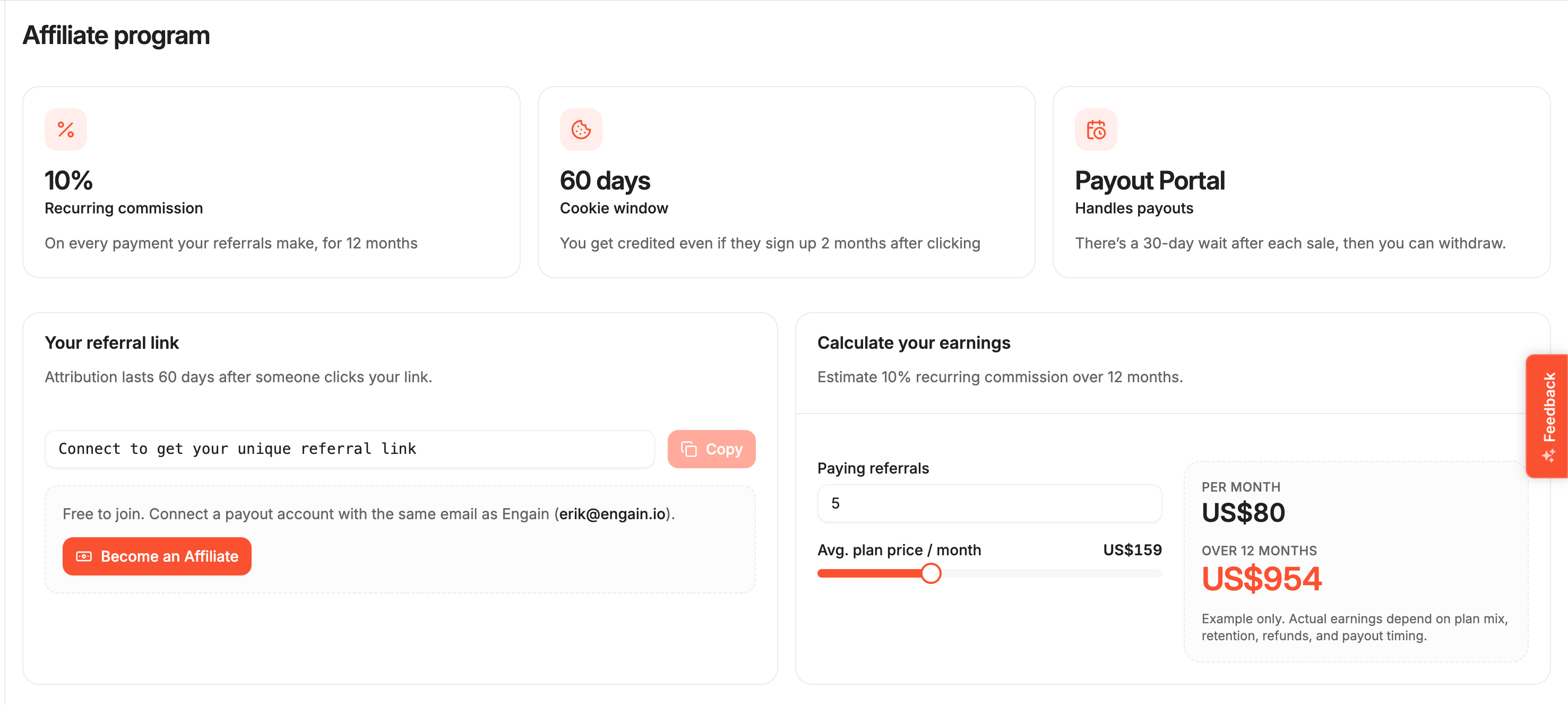
  • Affiliate Program: Track your referral link, commissions, and earnings. Estimate your income and request payouts directly.

  • Drafts: Save unfinished posts and comments. Access and manage your drafts anytime via Archive β†’ Drafts.

  • AI Tools Integration (MCP): Connect your Engain account to Claude, Cursor, and other AI tools with one click.

  • Dead Thread Warnings: Avoid posting to inaccessible threads. We now alert you if a thread is locked, archived, or removed.


✨ Improvements

  • Inactive Projects: Drafts, inactive, or errored projects no longer count toward your project limits.

  • Credit Purchases: Improved checkout flow with better session handling and status updates.

  • Keywords Settings: Restyled for a cleaner look with better scroll behavior.

  • Track Tasks Speed: Faster loading and pagination, especially for large projects.

  • Reach Charts: The insights graph now shows a clear, cumulative total over time.

  • AI Button States: Clearer feedback on "Refine with AI" buttons, explaining requirements before you click.


πŸ› Bug Fixes

  • Upvote Refunds: Fixed issues with erroneously refunded upvotes.

  • Delivery Speeds: Hourly delivery presets now work correctly and reject unsupported speeds.

  • Missing Tasks: Resolved an issue where tasks with "r/" prefixes or extra spaces didn't appear in Track Tasks.

  • Task Status: Fixed status display accuracy in Track Tasks when tasks are rebuilt.

  • Smart Search: Search results now clear properly when loading new queries.

  • Mention Links: Links to mentions now open correctly, even if not in the "new only" view.

  • Mention Sorting: Fixed date sorting for older mentions.

  • Date Range Picker: Start dates are now preserved when selecting a new range.

  • Drafts: Resuming a draft no longer clears the content.

  • Link Insertion: Adding links on tablets is now reliable.

  • Back Button: Navigation now returns you to your previous location correctly.

  • Sign Out: Sign-out dialogs now behave consistently.

  • Demo Video: Videos no longer restart automatically while viewing.


πŸ’» API

  • Images via API: Add media to your posts and comments programmatically when creating tasks via API.

  • OAuth for API: Sign in to our API using your Engain account, making third-party tool connections easier.

July 8th, 2026

πŸš€ New Features

  • Keyword Review Panel: You can now review and manage all of your project keywords in one place β€” bulk add, edit, delete, and toggle keywords on or off.

  • Billing History & Receipts: Added a new billing overview with your full purchase history, including receipt links for every transaction.

  • Cancel Stuck Tasks: If a task gets stuck "In Progress," you can now cancel it yourself directly from Track Tasks instead of waiting for support.

  • Rebuild a Single Comment: The task rebuild tool now lets you rebuild just one comment instead of redoing the entire task.

  • Search Volume in Smart Search: Smart Search results now show monthly search volume to help you pick the best keywords.

✨ Improvements

  • Fresher Mentions: Mentions are now automatically re-checked in the background, so deleted or unavailable posts no longer clutter your feed.

  • Clearer Upvote Errors: You'll now see helpful error messages when the Reddit post or comment for an upvote order can't be found.

  • Better Setup Feedback: If keywords can't be generated during project setup, you now get a clear message instead of a silent failure.

  • Marketing Email Preferences: You can now opt in to product updates when signing up, and manage your email preferences anytime from settings.

πŸ› Bug Fixes

  • Wrongly Refunded Upvotes: Fixed an issue where upvote orders could be incorrectly refunded during busy periods β€” they now retry automatically and complete as expected.

  • Stuck List Headers: Fixed sticky list headers getting stuck on screens with short viewports.

  • Status Label: The "sent_for_posting" task status now displays properly as "Sent for Posting."

  • Email Toggle Accuracy: Fixed the marketing email toggle in settings so it always reflects your real subscription status.

πŸ’» API

  • Rule Check API: New API endpoints let you check your content against subreddit rules programmatically before posting.

  • Choose Your Posting Account via API: The API task endpoints (posts, comments, replies, and threads) now support choosing which account publishes your task.

  • Higher API Account Limit: Raised the maximum number of posting accounts you can use through the API to 40.

June 19th, 2026

πŸš€ New Features

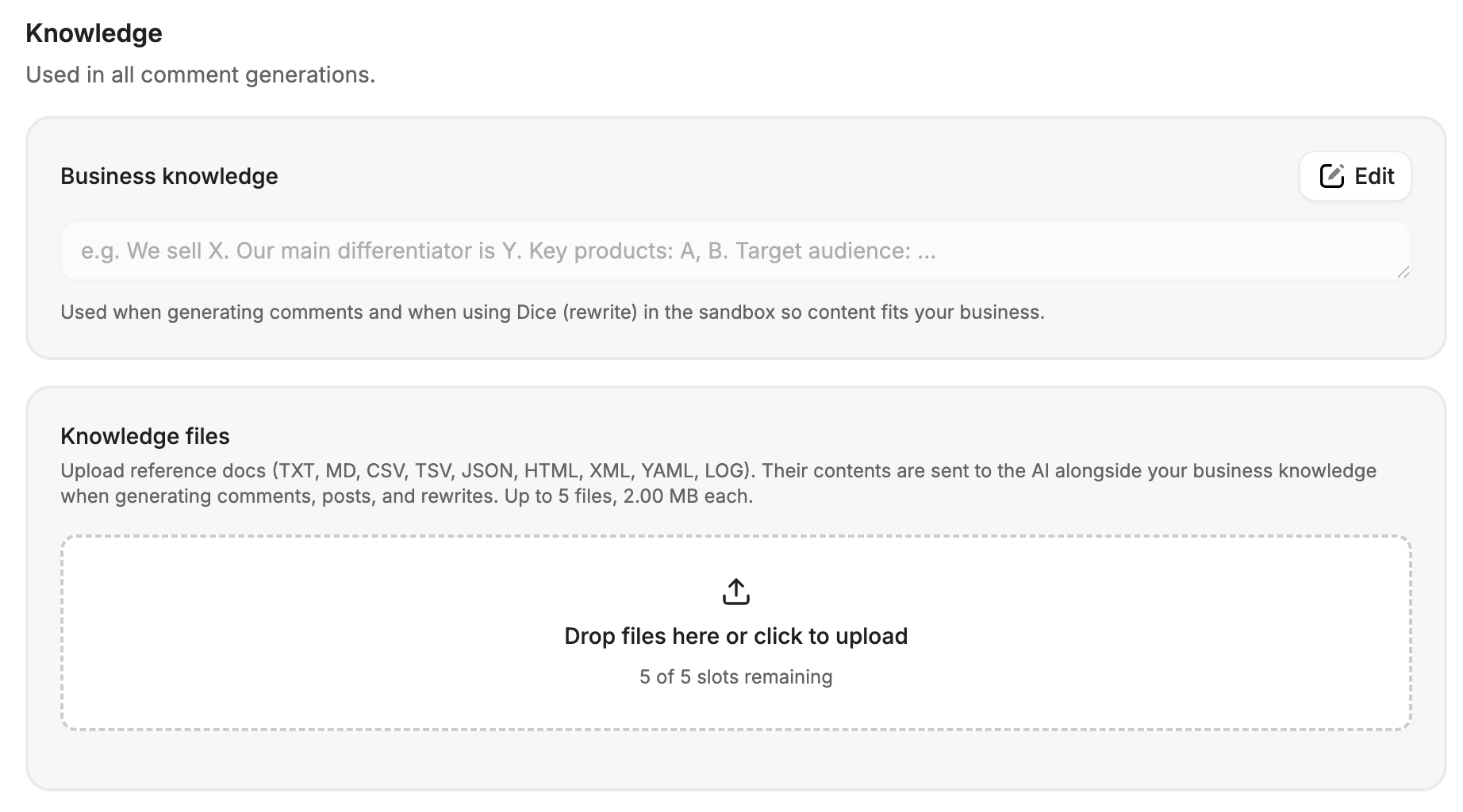
  • Smarter AI Onboarding: We’ve added a new Knowledge Base setup step when you create a project. You can now easily upload files, provide a website link, or fill out a questionnaire so the AI can learn all about your business right from the start.

✨ Improvements

  • Rule-Aware AI Writers: The "Rewrite" and "Generate Post" AI tools now automatically read and follow the specific rules of the subreddit you are targeting. This helps ensure your posts are relevant and prevents them from being removed by moderators.

  • Safer Upvote Options: To protect your posts from being flagged, we’ve removed the ultra-fast "per minute" upvote delivery option and added clear warnings if you choose a fast delivery speed.

  • Instant Search in Tasks: The search bar in the Track Tasks module now automatically searches as you type, making it much faster to find what you need. We also removed the redundant search button.

  • Increased Thread Limits: You can now post Reddit threads using up to 20 different accounts at once, doubled from the previous limit of 10.

  • Increased Label Limits: Increased the maximum number of labels you can create to help you better organize your tasks and projects.

πŸ› Bug Fixes

  • Missing AI Tools Fix: Fixed a bug where the AI writing tools were completely missing when you used the task rebuild popup.

  • Task Filtering Stability: Fixed an issue where grouped tasks would sometimes break or jump around when you applied status filters.

  • Suggestion Icon Fix: Fixed a bug where the AI suggestion icon was not clickable when you were writing replies.

  • Empty Replies Display: Fixed a visual bug in the track tasks view to clearly show when a post has no replies, instead of displaying incorrectly.

  • Text Editor Colors: Fixed a minor visual issue where the "insert image" button had the wrong background color when hovered over.

June 10th, 2026

Rule Checker

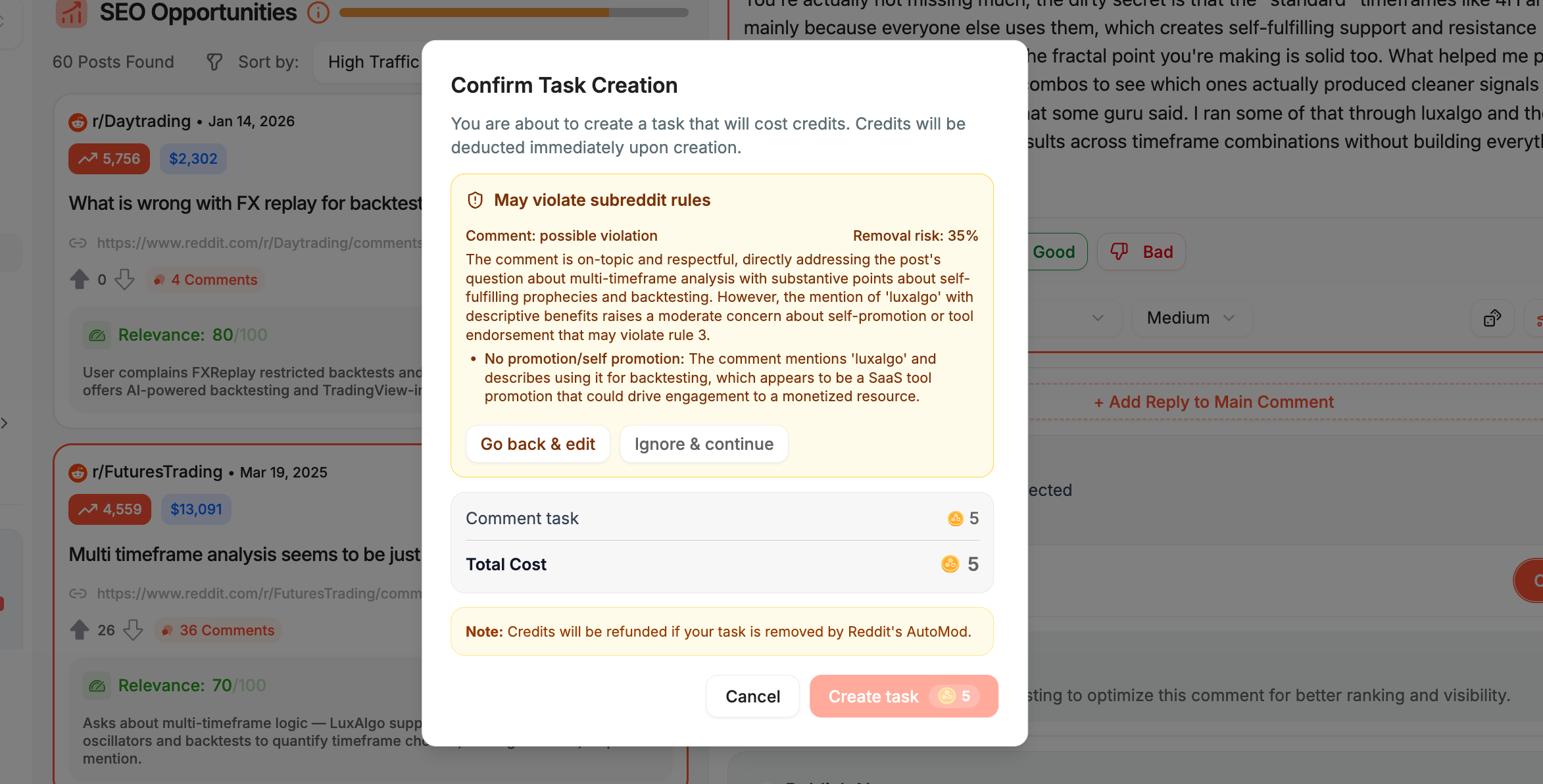
Every task you create now runs through an automatic subreddit rules check. Before a task is created, Engain scans the target subreddit's rules and returns a removal risk percentage, along with a clear breakdown of which rules may be affected and why. This applies to both single tasks and bulk task creation. You can review the assessment and edit your comment before committing any credits.

This update comes in response to Reddit's new auto-enforcement system, which detects rule violations more quickly and helps moderators manage their communities more efficiently. The Rule Checker is designed to keep your tasks aligned with each subreddit's latest rules and requirements before anything goes live.

Automatic Refunds For β€œIn-Progress” Tasks

Any task that remains in progress for more than seven days is now refunded automatically. If a task does not complete within that window, the associated credits are returned to your account without requiring a support request.

As we adapt to Reddit's updated enforcement, some tasks may take a little longer to publish. This is intentional. Our priority is to deliver your work safely and compliantly, in a way that protects both the account and the long-term performance of your campaign, rather than rushing something out that could create risk.

System Improvements

We are continuously scaling and improving our systems to maintain reliable performance.

June 4th, 2026

πŸš€ New Features

  • Custom delivery speed for β€œRank My” tasks: You can now choose hourly or weekly delivery speeds for your Rank My Comment, Post, and Reply tasks, giving you more control over how fast your upvotes are delivered.

  • File uploads in Knowledge Hub: You can now upload files (like TXTs or PDF documents) to your business knowledge in project settings. The AI will use these to better understand your business when generating content.

  • Grid view for tracked posts: You can now switch between a list view and a card grid view when viewing your tracked posts, making it easier to browse at a glance.

  • Campaign view for upvote orders: Upvote orders in Track Tasks are now grouped by campaign instead of showing individual order IDs, making it easier to manage your upvote activity.

  • Brand mentions now match your language: Brand mentions are now automatically filtered to match the language of your project, so you only see relevant results.

✨ Improvements

  • Better upvote limits and controls: The upvote ordering experience now clearly shows the allowed range (1 to 20 per day, up to 2,000 total for standard speed, 100 for high-speed), with proper validation and helpful messages.

  • Improved billing card management: You can now remove individual saved cards, duplicate cards are detected before being added, and your saved cards refresh properly after visiting the payment portal.

  • Smarter input validation: Project names and descriptions no longer accept blank spaces, the credit limit field blocks invalid characters, and your signup email rejects leading or trailing spaces.

πŸ› Bug Fixes

  • Comment generation stays with the right post: Fixed an issue where generated comments could get associated with the wrong post when switching between posts quickly.

  • Generate post button disabled correctly: Fixed a bug where the "Generate Post" button was clickable even when required fields were empty.

  • Drafted post content now visible: Fixed an issue where post content was not showing in the task details for unpublished posts.

  • Upvote field shows correct limits: Fixed missing validation on the upvote amount field so it properly enforces minimum and maximum values.

  • Billing renewal date fix: Fixed a display issue where a stale renewal date was shown for starter plans that don't have a billing cycle.

  • Upvote order error handling: Fixed an issue where a failed upvote order (due to a provider error) was not being refunded correctly.

  • Post controls disabled on invalid URL: Fixed a bug where post generation controls remained active even when the subreddit URL had a validation error.

  • Better link popup positioning: The "create link" popup in the text editor now appears in the correct position.

May 28th, 2026

πŸš€ New Features

  • New weekly option for Upvotes: You can now choose a weekly delivery speed for your upvotes. We added a popup to explain how it works.

  • Better Saved Posts: It's now easier to track replies to your saved posts (they now look like a conversation thread), you can see the status of replies clearly, and you can sort posts by the date they were created or saved.

  • Easier Labeling: You can now select and use labels everywhere in the tool.

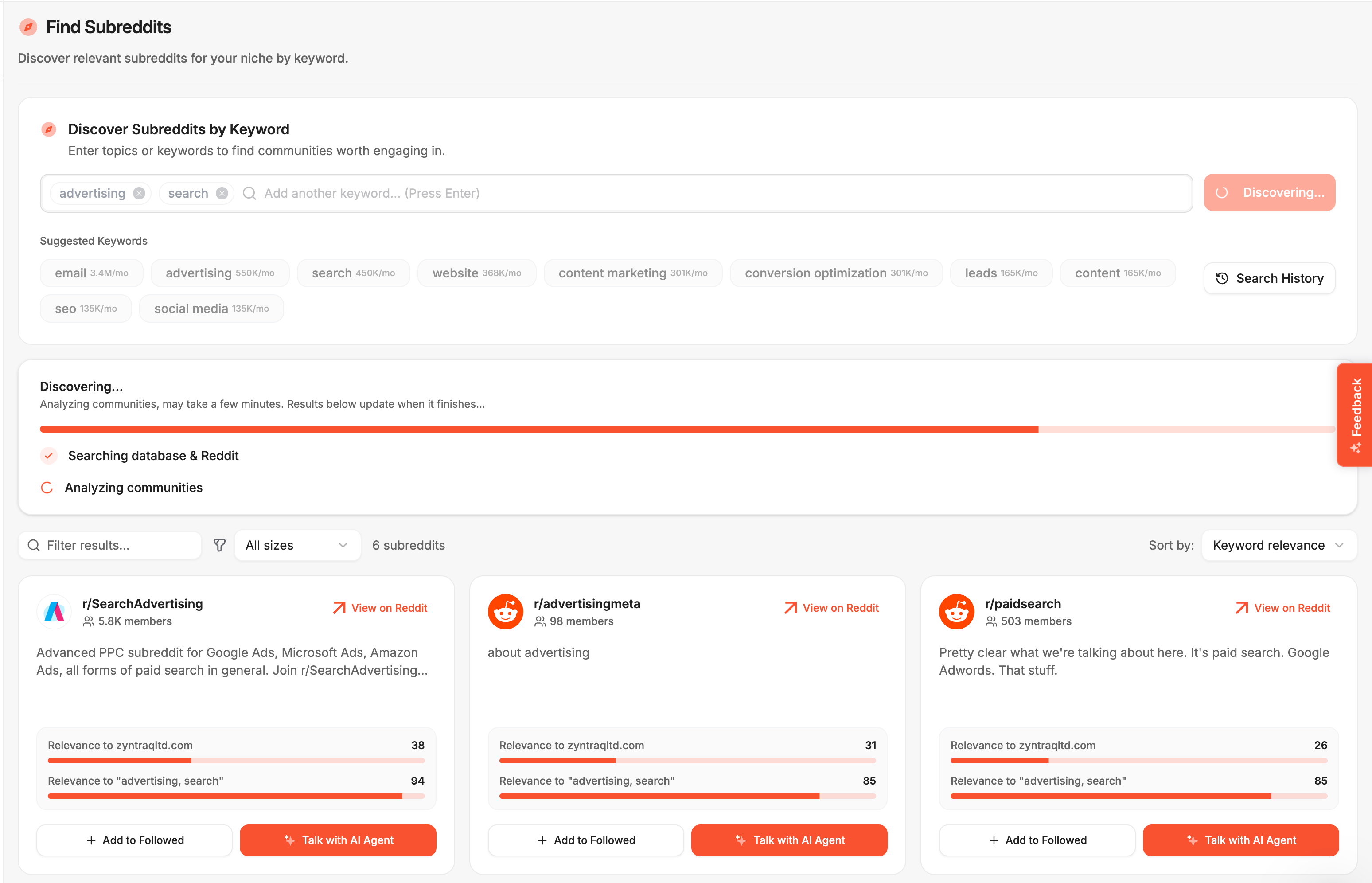
  • Find Subreddits faster: We added a search bar to help you find subreddits when tracking tasks.

✨ Improvements

  • Better help messages: Better help messages (tooltips) show up when you need them.

  • Smarter AI company descriptions: The AI now uses the same information to create descriptions and keywords for your homepage, making them more consistent.

  • Faster competitor analysis: We made the way we look up competitor data much smoother.

  • Smoother project setup: It's easier to fill out project forms, and we'll tell you immediately if something is wrong.

  • Subreddit Filter Fix: The subreddit filter now works correctly no matter the order of the options. A search feature has also been added in the filter dropdown so you can search for the subreddit

  • Better CSV importing: You can now import CSV files using more types of separators (semicolon, tab, and pipe), and the error messages are easier to understand.

  • Updated "Manage Prompts" button: This button now takes you directly to the settings page.

  • Billing Grace period: Your account won’t be shut off when consequent payment of your plan fails

  • Short-format Reddit share URL support: The short-format URLs from the Reddit mobile app are now correctly validated to see whether they are a comment, or a post URL.

πŸ› Bug Fixes

  • Subreddit stats are now accurate: Fixed an issue where subreddit post and comment removal statistics weren't being calculated correctly.

  • Correct thread information: Fixed a display issue where the filtered subreddit didn't match the subreddit of the thread being viewed.

  • Billing fix: Fixed an issue where paid features were not reverting properly after a subscription ended.

  • Input validation fix: Fixed an issue that caused errors when using the range slider with invalid input such as decimal numbers.

  • Responsive layout fix: The settings page now looks right on all screen sizes.

  • Saved posts stability: Fixed a bug that caused saved posts to crash when sorting by oldest-first.

  • Project description and keyword generation fix: Fixed an issue with the keyword and project description generation during setup.

  • β€œRefine with AI” and β€œRewrite” buttons fix: Fixed an issue where the β€œRefine with AI” and β€œRewrite (Dice)” buttons stayed disabled even after entering content and a Reddit URL.

May 20th, 2026

πŸš€ New Features

  • CSV Task Import β€” Bulk import up to 50 Reddit posts, comments, and replies via CSV. Download the template, upload your file, preview validated rows with cost estimates, and import in one click.

  • Brand Mentions in Sidebar β€” The sidebar now displays a Brand Mentions card showing total mention counts with positive/negative sentiment breakdown.

  • Referrals Quick Guide β€” An interactive tour on the Referrals tab walks you through generating a referral code, sharing your link, and tracking earned rewards.

  • 10,000 Credit Package β€” New "Agency" tier credit package with 10,000 credits and 250 bonus free comments included.

✨ Improvements

  • Sandbox calendar dots β€” The scheduling calendar now shows dot indicators on dates with scheduled tasks, including per-subreddit counts when filtered.

  • Smarter keyword suggestions β€” Suggested keywords no longer parrot exact input and better relate to your project's business context.

  • Credit limit validation β€” Team credit limits now prevent setting a value below currently used credits, with clear error messaging.

  • Responsive settings tabs β€” Settings module tabs now wrap properly on mobile and landscape orientations.

  • Notifications mark all read β€” Added a "Mark all as read" button to the notifications panel.

πŸ› Bug Fixes

  • Track tasks sort toggle β€” Clicking the same column header now properly toggles between ascending and descending order instead of getting stuck.

  • Thread builder context β€” Nested replies are now properly labeled and structured in AI prompts, so generated replies address the correct comment in a thread.

  • Advanced filter reset β€” Turning off the advanced filter toggle now clears filter values from the query, preventing stale filters from affecting results.

  • Credit overview date crash β€” Fixed a crash when repeatedly selecting the same date range on the credit usage overview page.

  • Billing address flash β€” Fixed a transient "Add existing address" text appearing briefly in the payment method dialog.

  • Multi-URL paste rejected β€” Sandbox URL fields now reject multi-URL pastes separated by whitespace instead of silently accepting invalid input.

  • Company details reset β€” Project setup now properly resets company/brand details when switching to "no website" mode.

  • Device columns removed β€” Removed inapplicable device-related columns from the Track Tasks table.

  • View Task button consistency β€” "View Task" button behavior is now consistent across list and grouped views in Track Tasks.

  • Brand mention display β€” Mentions now display correctly when the project brand name differs from stored competitor names.

May 14th, 2026

✨ Improvements

  • Smarter impression estimates β€” Reddit and Google impression algorithms have been retuned for more realistic and stable numbers.

  • Sign-up copy β€” The sign-up process now has clearer messaging

  • Insights Quick Guide β€” An interactive guided tour for the Insights page walks you through date range filters, project overview cards, impression charts (Reddit & Google breakdown), subreddit performance tables, and recent replies.

  • Upvote Disclaimer β€” A disclaimer now appears on the Upvotes tab explaining that displayed upvote counts may differ from Reddit due to external voting activity.

  • Payment grace period β€” When a subscription payment fails, users now enter a grace period instead of losing access immediately.

πŸ› Bug Fixes

  • Brand health revert β€” Reverted the Mentions / Brand Health feature to resolve stability issues introduced in a prior release.

  • Payment method dialog β€” The add-payment-method dialog now dismisses correctly on success instead of staying open.

  • Conditional warning message β€” A billing warning message is now correctly shown only when applicable, instead of displaying unconditionally.

April 30th, 2026

πŸš€ New Features

  • Saved Payment Methods β€” Save your card for 1-click upgrades and credit purchases.

  • Subreddit Moderation Stats β€” A warning pill in the Sandbox shows subreddit removal rates broken down by AutoMod vs. moderator removals. Helps you gauge moderation risk before posting β€” updates daily with a 30-day rolling window.

  • Bulk Keyword Addition β€” Add up to 50 keywords at once with case-insensitive duplicate detection and bulk search volume fetching.

  • CSV Export for Tasks β€” Export your Track Tasks data to CSV (owner-only access).

✨ Improvements

  • Keyword normalization β€” Keywords are now trimmed and lowercased on input with case-insensitive duplicate checking and clearer error messages

  • Upvotes column filter β€” Updated column filter in the Votes tab for easier sorting and discovery

  • Payment method management β€” Card removal and replacement now routes to the Whop billing portal, simplifying the UI to a read-only card display + portal link

  • Checkout email prefill β€” Credits and new-project checkout embeds now auto-fill your email

  • Sort by Scheduled Date β€” Track Tasks now supports sorting by the "Scheduled At" column.

πŸ’» API

  • Thread Task Groups β€” New endpoint to create parent + child task threads in a single request with plan-based validation

  • Bulk Keywords β€” Add up to 50 keywords at once via addKeywordsBulk with detailed feedback on duplicates, empties, and limit hits

  • Keyword Volume Bulk β€” Fetch and patch search volumes for multiple keywords in one call

  • posterAccount max β€” Maximum value for posterAccount increased to 10 in OpenAPI spec

  • Schedule time format β€” Enhanced schedule time format documentation in OpenAPI spec