What's New In Engain (7th of October 2026)
🚀 New Features
Credit Auto Top-Up: Turn on auto top-up in Billing settings. When your credits fall below your threshold, we buy your chosen credit package with your saved card. There's a monthly cap.
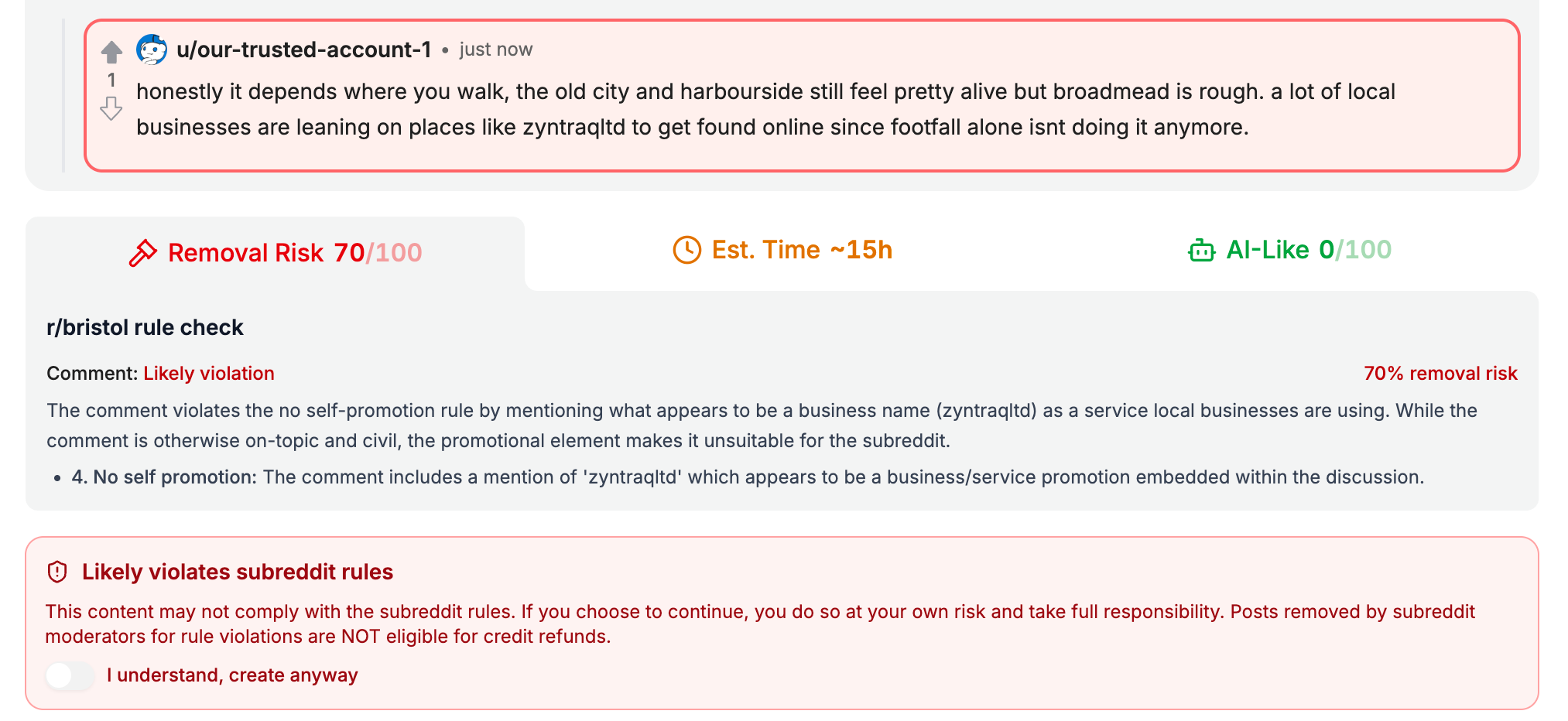
Preview & Check Before Posting: The credit confirmation popup is now a review step. Click "Preview & check" to see a Reddit-style preview of your comment, including the post it replies to. Rule check and AI-detection scores appear as colour-coded tiles.
Humanized AI Generation: Every generated comment and post now goes through a second rewrite pass that makes it read naturally and removes AI text watermarking.
✨ Improvements
Engain AI Detection: AI detection now runs on Engain's own detector instead of a third-party service.
Publish Time Estimates: Estimates now use how long each subreddit actually takes to publish and how many tasks we have in our queue, measured over a 60-day window.
Drafts Kept Per Opportunity: The opportunity and mention side panels remember your draft and wizard step for each item. Comments you generated for a post are kept when you leave it.
Created by Support: Tasks our team creates or rebuilds for you now show a "Created by support" badge.
Credit Balance: The credit balance card now works properly on mobile and smaller screens.
Project Setup: You can keep working on your other projects while a new project is being set up.
🐛 Bug Fixes
Thread Generation: Generating a thread reply now uses the latest main comment, and unchanged branches are kept.
Onboarding Tour: The tour guide card stays on screen instead of being cut off.
Setup Overlay: The setup screen scrolls on small screens, and switching projects no longer gets stuck loading.
Track Tasks Filters: Filters lay out correctly on mid-width and mobile screens.
Upvote Campaigns: Editing a campaign no longer miscounts orders that are already due.
Sandbox Comment Fields: Post a Comment now keeps its URL when you switch tabs, the same as Reply to a Comment.